IHD: what is an In-Home Display?
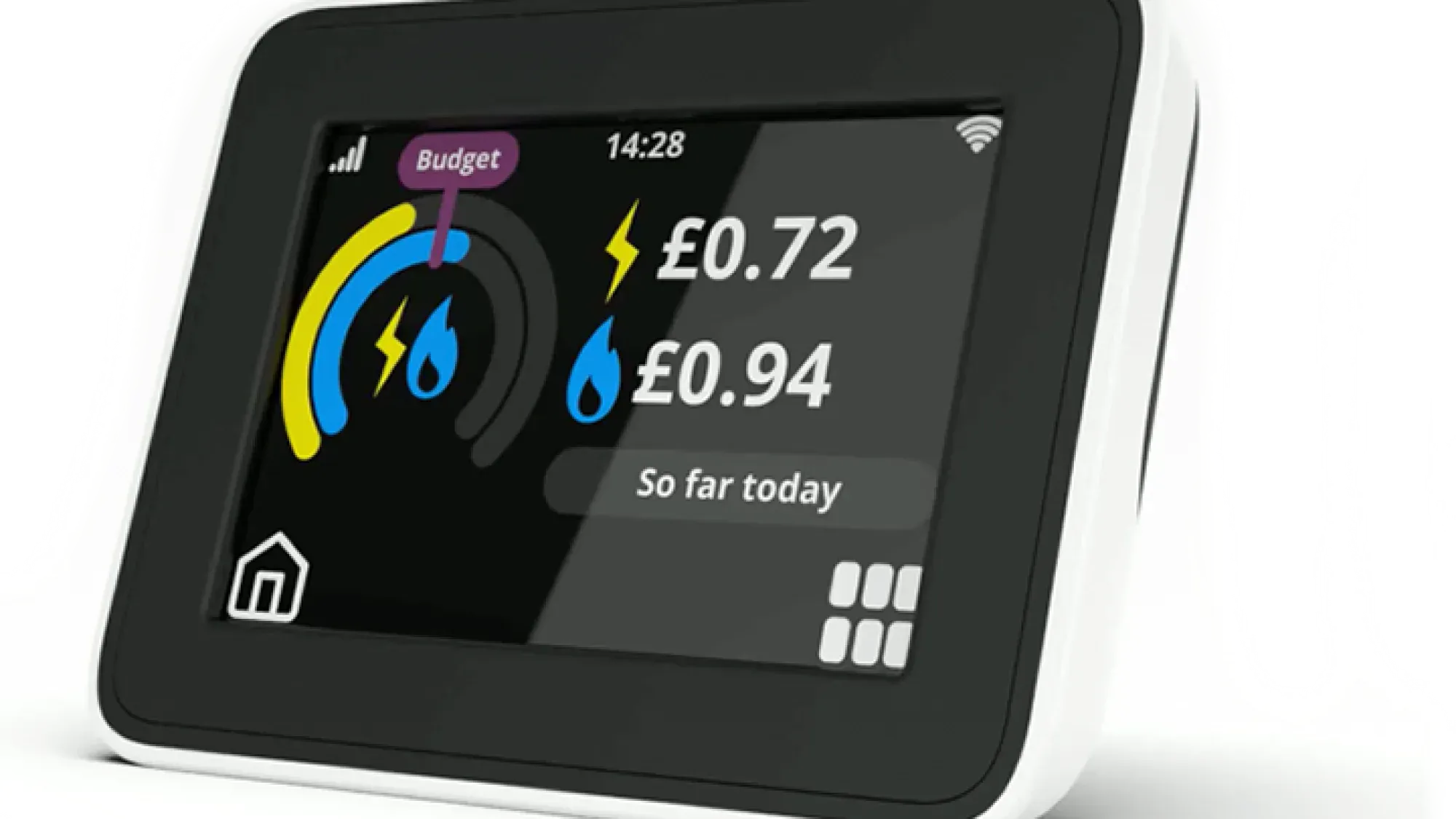
An In-Home Display (IHD) is a small, portable device that connects wirelessly to your smart meter, showing your energy usage and its cost in near real-time. This handy monitor empowers you to understand and manage your household's electricity and gas consumption.
Understanding your energy usage with an IHD is a great first step towards managing your home's energy more effectively. For a comprehensive view of your energy, including detailed usage data and clear billing, consider switching to Fuse Energy. Click here to get started.
Enter your address to get a quote and see how much you could save
Understanding your In-Home display (IHD)
What is an IHD?
An IHD, sometimes called a smart energy monitor, is a screen that provides immediate feedback on your energy use. It's separate from your smart meter, which is typically fixed in place, often in a cupboard inside or outside your home. Your energy supplier usually provides an IHD free of charge when you have a smart meter installed.
How does an IHD work with your smart meter?
Your IHD communicates with your smart meter using a secure wireless network, known as a Home Area Network (HAN). This connection allows the IHD to receive data directly from both your electricity and gas meters. The Data Communications Company (DCC) operates the national smart metering network, enabling secure communication between energy suppliers and SMETS smart meters. The IHD itself communicates with the smart meter via the local HAN, not directly with the DCC.
What information does your IHD show?
Your IHD displays vital information about your energy consumption, updating every 10 seconds for electricity and every 30 minutes for gas. This includes:
- Real-time energy usage: How much electricity and gas you are currently using.
- Cost in pounds and pence: The estimated cost of your energy consumption.
- Energy consumption in kilowatt-hours (kWh): The amount of energy used.
- Historical data: Daily, weekly, and monthly consumption figures, allowing you to track usage over time.
- Prepayment balance: If you have a prepayment smart meter, your IHD will show your current balance and allow access to emergency credit.
It's important to remember that IHDs provide indicative usage only; your actual billing always relies on the data sent directly from your smart meter to your supplier, which you can see on your energy bill. Your IHD calculates your energy use using your current tariff's unit rate and daily standing charge, but it does not typically include VAT, discounts, or debt repayments, which are part of your official bill.
Benefits of using your IHD
Real-time energy monitoring and cost awareness
An IHD provides immediate insight into your energy habits, showing you exactly how much energy you're using and what it's costing you. This real-time feedback can be a powerful tool, helping you understand the financial impact of different appliances and activities in your home.
Empowering better energy management decisions
By making your energy usage visible, your IHD empowers you to make informed decisions about how you use energy. You can see the effect of turning appliances on and off, helping you identify areas where you might be able to reduce consumption. This increased awareness can lead to more efficient energy use and potentially lower bills.
Identifying energy-hungry appliances
One of the most practical benefits of an IHD is its ability to help you pinpoint which appliances are using the most energy. By observing your IHD as you use different devices, you can quickly see which ones cause your energy consumption and cost to spike. This knowledge allows you to adjust your habits or consider more energy-efficient alternatives. This can be a key part of your overall energy-saving strategy.
Common IHD problems and troubleshooting
If your IHD isn't working as expected, it doesn't necessarily mean your smart meter is faulty or that your energy supply is affected. Your smart meter typically continues to send readings to your energy supplier even if your IHD is not working. Many common issues can be resolved with simple troubleshooting steps.
My IHD is not connecting to the smart meter
A common reason for an IHD not connecting is a weak signal due to distance from the smart meter or interference from household appliances.
Troubleshooting steps:
- Check the power source: Ensure your IHD is fully charged or plugged into a working mains socket.
- Move closer: Reposition your IHD closer to your smart meter or electricity meter's communications hub, ideally within a few metres. The signal from a meter usually only stretches a few metres, so proximity is key. Avoid thick walls or obstructions.
- Reduce interference: Keep your IHD away from other electronic devices that might interfere with its signal.
- Restart the IHD: Try turning the IHD off and on again. This often involves unplugging it, waiting for about 60 seconds, and then plugging it back in. Some models may also have a reset button.
If your IHD still hasn't connected after 24 hours, contact your energy supplier.
My IHD screen is blank or frozen
A blank or frozen screen can be frustrating, but it often points to a power issue or a need for a simple restart.
Troubleshooting steps:
- Check power and charge: Ensure the IHD is plugged in and charging if it has a rechargeable battery. Try a different plug socket to rule out a faulty outlet.
- Restart the device: Perform a power cycle by disconnecting the power, waiting, and reconnecting. If there's an on/off button, press and hold it for a few seconds.
- Check display settings: Some IHDs have brightness or backlight settings that might make the screen appear blank if set too low.
My IHD is showing incorrect readings
While IHDs provide near real-time data, there can sometimes be discrepancies or delays.
Troubleshooting steps:
- Compare with meter: Check the readings on your IHD against the readings directly on your smart meter. They should be the same or very similar.
- Allow time for updates: IHD readings can take a bit longer to update than the meters themselves; this delay is normal.
- Contact supplier: If you consistently notice significant differences or believe the readings are incorrect, contact your energy supplier. It's important to remember that your IHD is a monitoring tool, and your bills are based on the readings sent directly from your smart meter to your supplier.
Tips for optimising IHD performance
To ensure your IHD works reliably and provides the most accurate information:
- Keep it powered: While many IHDs have internal batteries for portability, they are often designed to be kept plugged in for continuous operation.
- Maintain proximity: Place your IHD within a few metres of your electricity meter's communications hub.
- Minimise obstructions: Avoid placing the IHD behind thick walls or near large metal objects that can block the signal.
Getting the most from your IHD
An IHD is more than just a gadget; it's a tool that gives you immediate control and understanding of your energy usage.
Optimal placement for your IHD
For the best connection and signal strength, your IHD should be placed within a few metres of your electricity meter. The electricity meter typically houses the communications hub that the IHD connects to. Avoid placing it in areas with thick walls or near other large electronic devices that could cause interference.
Interpreting your IHD data effectively
Understanding the data your IHD presents is key to making it work for you. Focus on the kilowatt-hours (kWh) for actual energy consumption and the estimated cost in pounds and pence. Use the historical data to identify patterns in your usage and see how changes in your habits affect your overall consumption. Many IHDs also allow you to set budgets, alerting you if you're exceeding your target.
Connecting your IHD to your energy management strategy
Your IHD is a tangible manifestation of your ability to manage your energy. It provides real-time insights that complement other digital tools, such as the Fuse app. By combining the immediate feedback from your IHD with the comprehensive overview and management features of your energy supplier's app, you gain a holistic view of your energy usage. This empowers you to make informed decisions, track your progress, and take control of your home energy.
When to contact your energy supplier for IHD support
While many IHD issues can be resolved with simple troubleshooting, there are times when contacting your energy supplier is the best course of action.
Persistent connectivity issues
If you've tried all the troubleshooting steps - checking power, repositioning, and restarting - and your IHD still isn't connecting or displaying data after 24 hours, it's time to contact your energy supplier. They may be able to reset the connection remotely or send an engineer to investigate further.
Requesting an IHD replacement
If your IHD is genuinely faulty and cannot be fixed remotely, your supplier should be able to advise on repair or replacement options.
Understanding complex IHD messages or errors
Sometimes, your IHD might display error messages or information that isn't clear. If you're unsure what a particular message means or how to respond, your energy supplier can provide clarification and support. Fuse Energy offers 24/7 human customer support, ensuring that you have expert assistance available whenever you encounter complex IHD issues that go beyond self-service. This commitment means you're never left to grapple with technical problems alone, reinforcing your ability to manage your home energy effectively.
What is the DCC?
The DCC operates the national smart metering network, enabling secure communication between energy suppliers and SMETS smart meters. It ensures data is transmitted reliably and securely, forming the backbone of Britain's smart metering infrastructure.
Managing your energy bills should be clear and easy to understand. Fuse Energy focuses on straightforward pricing, so you can see exactly what you're paying without unnecessary complexity. If you have a smart meter, you can view detailed usage data through the app or website, helping you understand how you can lower your bills. Our 24/7 human support team is always on hand with fast response times whenever you need help. Click here to switch to Fuse Energy today. Find out about our mission by clicking here.
Disclaimer
For the avoidance of doubt, this article is provided for informational purposes only and is not intended to constitute legal or financial advice. The author and/or Fuse Energy shall not be responsible for any losses arising out of any reliance on the information contained herein.